How AI Voice Agents Are Transforming HVAC Scheduling for Small Contractors in 2026

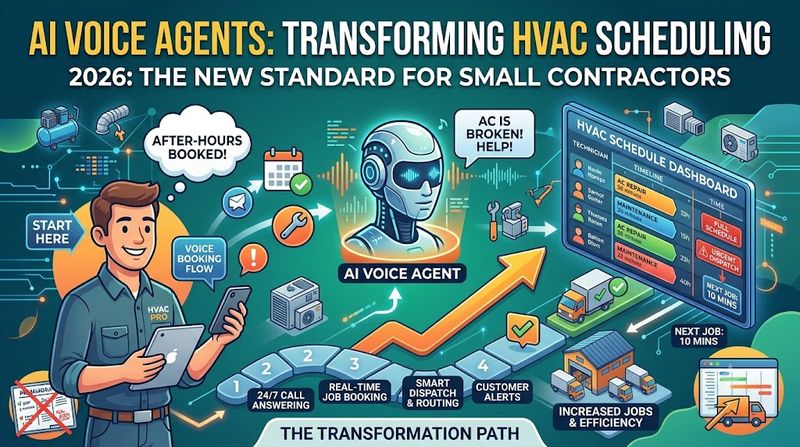
Key takeaway: AI voice agents are no longer experimental for HVAC contractors—they are becoming standard infrastructure. In 2026, small contractors using AI answering and scheduling tools report 24/7 lead capture, zero after-hours voicemail black holes, and conversion rates climbing from under 30% to double-digit improvements. The technology has matured from clunky IVR phone trees to natural, conversational AI that books jobs directly into dispatch boards while contractors stay focused on the work.
The Scheduling Crisis Every Small HVAC Contractor Faces
If you run a small HVAC contracting business, you already know the math. A customer calls with a broken AC on a 95-degree afternoon. You are inside an attic, hands full of tools, and your phone rings. You miss the call. By the time you finish the job and call back, they have already booked with your competitor.
This is not a hypothetical scenario. It is the daily reality for most small contractors. According to the ServiceTitan 2024 Pulse Report, the average HVAC contractor converts fewer than 30% of inbound leads into booked jobs. A significant portion of that gap comes from unanswered calls, slow callbacks, and after-hours blackout windows when no one is available to pick up the phone.
The problem compounds during peak season. A summer heat wave can triple call volume overnight. Most small contractors operate with one or two office staff, if any. When the phones blow up, something breaks: either calls go unanswered, or the quality of intake suffers, or both.
Before AI voice agents, the options were limited and expensive:
- Hire more CSRs: At $35,000–$50,000 per year plus benefits, this is often cost-prohibitive for shops under $2M in revenue
- Traditional answering services: Live agents who take messages but rarely book appointments, creating a callback bottleneck
- IVR phone trees: "Press 1 for HVAC service, press 2 for billing"—systems that frustrate 87% of consumers and kill conversion
- Voicemail: The silent revenue killer. Most callers who reach voicemail never leave a message, and those who do rarely convert
AI voice agents solve this by replacing the phone tree with a conversational assistant that answers naturally, qualifies the caller, checks availability, and books the job directly into your calendar or dispatch board. The contractor never has to touch the phone.
What Changed in 2026: From IVR to Conversational AI
The leap from 2024 to 2026 in voice AI technology is not incremental. It is a category shift. The systems available today are fundamentally different from the keyword-matching IVR systems that frustrated customers for decades.
Three Technologies That Matured in 2026
1. Large Language Models Optimized for Voice
Modern AI voice agents run on large language models fine-tuned for phone conversations. They understand context, handle interruptions, ask follow-up questions, and maintain conversational memory across a call. When a customer says, "My furnace is making a weird banging noise and it's leaking," the AI understands this is an urgent heating issue, not a routine maintenance request. It asks smart follow-ups—"Is the power completely out?" or "Where is the leak coming from?"—and tags the job appropriately for dispatch.
2. Real-Time Calendar and Dispatch Integration
2026 voice agents do not just take messages. They connect directly to field service management platforms like ServiceTitan, Housecall Pro, and Jobber. When a caller agrees to a time slot, the AI writes the appointment directly into the live dispatch board, checks for technician availability, and prevents double-booking. The job appears on the technician's mobile app before the customer hangs up.
3. Multilingual and Multichannel Capability
Leading platforms now support English, Spanish, French, and Portuguese natively. Some also handle SMS and WhatsApp alongside voice calls, capturing leads from Google Business Profile messaging and web chat in the same workflow. For contractors serving diverse communities, this is a competitive advantage that was previously available only to large franchises.
Why 2026 Is the Tipping Point
Small-business AI adoption has accelerated dramatically. One 2025 survey found AI usage among small businesses rose from 39% to 55% in a single year—a 41% jump. By the end of 2025, the Federal Reserve estimated that firms employing roughly 78% of the US labor force had adopted AI in some form. In the trades specifically, venture capital is flowing into HVAC-focused AI products: Avoca, an AI call platform built for HVAC, plumbing, and roofing, was profiled by Fortune as a venture-backed startup built around catching the calls contractors miss.
The technology is no longer bleeding-edge. It is affordable, deployable in under an hour, and proven in production at thousands of HVAC shops.
How AI Voice Agents Handle HVAC Scheduling End-to-End
Understanding the mechanics helps contractors evaluate tools and configure them correctly. Here is the step-by-step flow of a modern AI voice agent handling an HVAC service call.
Step 1: Call Interception and Greeting
The AI answers the call within one ring, 24/7. It greets the caller with a customizable script: "Thank you for calling [Company Name]. This is your AI assistant. How can I help you today?" The voice is natural, not robotic. Most platforms offer multiple voice options, and some allow custom voice cloning for brand consistency.
Step 2: Intent Recognition and Job Qualification
The AI asks what the caller needs and listens for intent signals. For HVAC, it distinguishes between:
- Emergency calls: "No heat," "AC is completely out," "gas smell," "water leaking from the unit"
- Urgent repairs: "Strange noise," "not cooling enough," "furnace cycling on and off"
- Routine maintenance: "Annual tune-up," "filter change," "maintenance plan check"
- New installation quotes: "Replace my system," "new construction," "add a mini-split"
It collects critical details: equipment brand and model (if known), symptoms, age of system, property address, and whether the caller is an existing customer.
Step 3: Customer Lookup and Personalization
For returning customers, the AI pulls history from the CRM in real time. It can say, "I see we serviced your Carrier unit last March. Is this the same system?" This personalization builds trust and speeds intake. It also flags maintenance plan members for priority scheduling and automatic discount application.
Step 4: Availability Check and Appointment Booking
The AI queries the live calendar and offers available slots. For emergency calls, it may offer same-day or next-day windows. For routine maintenance, it offers broader availability. The caller selects a time, and the AI confirms:
- Date and time window
- Service type and estimated duration
- Property address and contact details
- Any special access instructions
The appointment is written directly into the field service management system. No manual re-entry. No transcription errors.
Step 5: Confirmation and Follow-Up
Immediately after booking, the AI sends an SMS confirmation to the customer with appointment details, technician name (if assigned), and a link to reschedule if needed. It can also send a pre-appointment reminder 24 hours before the visit, reducing no-shows by 30–50%.
Step 6: Dispatch Notification
The AI alerts the assigned technician via SMS or push notification with job details, customer history, and equipment notes. For emergency calls, it can page the on-call tech directly and provide an ETA to the customer while the tech is en route.
Step 7: Escalation to Human CSR
When a call requires human judgment—complex commercial quotes, billing disputes, or emotionally escalated situations—the AI transfers seamlessly to a live CSR with full context. The customer never has to repeat themselves. The CSR sees the transcript, collected details, and reason for escalation before picking up the call.
The Real ROI: Numbers That Matter to Small Contractors
ROI for AI voice agents is not theoretical. It is measurable in booked jobs, recovered after-hours leads, and reduced administrative labor. Here is what the data shows for small HVAC contractors in 2026.
Lead Conversion: From Under 30% to Double-Digit Gains
The baseline is stark: the average HVAC contractor converts fewer than 30% of inbound leads into booked jobs. The primary leak is missed calls. According to industry research, 27% of calls to home-services businesses go unanswered. For a contractor receiving 200 calls per month, that is 54 missed calls. At an average ticket of $400, even a conservative 20% conversion rate on recovered calls represents $4,320 in recovered monthly revenue.
Contractors who implement structured inbound lead-capture workflows—including AI voice agents—see measurable conversion rate improvements. The biggest gains come from after-hours calls that previously went to voicemail and never converted. One study found that 5-minute response rates are 100 times more effective than 30-minute callbacks. AI handles the 5-minute window automatically, every time.
After-Hours Revenue Recovery
For most small contractors, 30–40% of calls arrive outside business hours: evenings, weekends, and holidays. Before AI, these calls went to voicemail. Industry data suggests that over 60% of consumers prefer to book home services via a direct call, but they will move on immediately if they hit a machine. AI voice agents capture these calls live, qualify the lead, and book the appointment while the contractor is off-duty. For a shop receiving 60 after-hours calls per month, recovering just 15% at $400 per ticket adds $3,600 in monthly revenue that was previously lost.
Administrative Labor Reduction
A small HVAC shop typically spends 10–15 hours per week on phone intake, scheduling, and confirmation calls. At $25 per hour for office staff, that is $1,000–$1,500 per month in labor. AI voice agents handle the majority of this work automatically, reducing human phone time to complex escalations and relationship management. For solo operators, the time savings are even more valuable: every hour not spent on the phone is an hour available for billable work.
Cost Comparison: AI vs. Human Alternatives
| Solution | Monthly Cost | 24/7 Coverage | Books Appointments | CRM Integration |
|---|---|---|---|---|
| Full-time CSR | $3,000–$4,500 | No (business hours only) | Yes | Manual |
| Live answering service | $285–$600 | Yes | Rarely | Message relay only |
| AI voice agent | $49–$199 | Yes | Yes | Native/API |
AI voice agents deliver 24/7 coverage, native appointment booking, and CRM integration at roughly 10–15% of the cost of a full-time CSR and 20–50% of the cost of a live answering service.
No-Show Reduction
Automated SMS confirmations and reminders reduce no-show rates by 30–50%. For a contractor booking 80 appointments per month with a 15% no-show rate, cutting that to 8% recovers 6 appointments. At $400 per ticket, that is $2,400 in recovered monthly revenue.
Top AI Voice Agents for HVAC Contractors in 2026
The market has matured into distinct tiers. Here are the leading options, ranked by fit for small contractors.
Tier 1: All-in-One Field Service Platforms with Built-In AI
QuoteIQ
Best for: Small-to-mid HVAC shops wanting AI voice, scheduling, and estimating in one platform.
Starting price: $29.99/month
Key AI features:
- AI Autopilot: voice-driven CRM control with 35+ functions—create estimates, update schedules, pull customer history by voice from inside an attic
- Virtual Call Team: 24/7 AI call answering that qualifies leads, books emergency dispatch, and fires follow-up texts
- AI Estimator: photo-based pricing that generates complete HVAC estimates in under 3 minutes from job-site photos
- MapMeasure Pro: satellite measurement for replacement load sizing
- Options Estimates: tiered system pricing (16 SEER / 18 SEER2 / 20 SEER2)
Why it wins: QuoteIQ is the only platform that bundles voice AI, call answering, and AI estimating on every plan with no add-ons and no per-user fees. For the 95% of HVAC businesses under $5M in annual revenue, this is the strongest all-in value. The voice control feature is a genuine differentiator for technicians whose hands are constantly occupied.
Limitations: No pre-loaded HVAC flat-rate pricebook with 30,000 repair codes (FieldEdge wins here). No native consumer financing integration. Commercial HVAC tools are lighter than enterprise platforms.
ServiceTitan
Best for: Established HVAC operations with 20+ technicians and $5M+ annual revenue.
Starting price: Custom quote (typically $245–$500 per tech per month plus implementation)
Key AI features:
- Titan Intelligence: AI for scheduling, dispatch, and call booking
- Atlas AI: deeper commercial workflow automation
- Enterprise reporting and operations tooling
- Large integration ecosystem
Why it wins: Unmatched depth for multi-location, multi-technician operations. Strong commercial HVAC workflows including AIA billing.
Limitations: Enterprise-scale pricing and onboarding. Overkill for solo operators and small shops. AI is part of a larger platform, not a standalone solution.
Tier 2: Dedicated AI Answering Services
Rosie
Best for: Solo operators and small shops needing affordable 24/7 phone coverage.
Starting price: ~$49/month
Key features:
- Answers calls 24/7 in a natural voice
- Books appointments and captures leads
- Sends call transcripts and summaries
- Purpose-built for home services
Trade-off: Phone-only. Does not manage email, scheduling tools, or back office. Minute overages can add up at higher call volumes.
Trillet
Best for: Small HVAC shops wanting multi-channel (voice + SMS + WhatsApp) on a budget.
Starting price: $49/month (150 minutes included)
Key features:
- Multi-channel: voice, SMS, and WhatsApp
- Auto-callback for missed calls
- Calendar integration included
- HIPAA compliance included
- 5-minute setup
Trade-off: Per-minute pricing means costs scale with call volume. At 200 minutes per month, total cost is $59. Still competitive, but not unlimited.
Sameday
Best for: Contractors focused on converting inbound calls into booked jobs.
Starting price: Custom quote (via demo)
Key features:
- Optimized for home-service trades (HVAC, plumbing, electrical)
- Integrates with ServiceTitan and other field-service platforms
- Covers after-hours and overflow calls
Trade-off: Phone-centric. No published pricing. Requires demo to evaluate.
Tier 3: AI-Native Phone Systems
Allo
Best for: Mobile-first contractors who need unlimited AI answering with predictable costs.
Starting price: Business plan with unlimited AI answering
Key features:
- Unlimited AI answering (no per-call or per-minute charges)
- Mobile-first: configure AI receptionist from your phone
- Train AI on your website or uploaded documents
- CRM syncing (HubSpot, Pipedrive, Zapier)
Trade-off: No direct appointment scheduling through AI receptionist yet. No visual workflow builder for complex call routing.
Quo Sona
Best for: Contractors who want visual workflow control and SMS-first communication.
Starting price: $25/month (40 calls) to $199/month (600 calls)
Key features:
- Visual workflow builder for branching call logic
- Automated SMS during calls (scheduling links, directions, forms)
- Call summaries and transcripts on all plans
Trade-off: Per-call pricing. During peak season, a shop handling 300 calls per month pays $99/month for the AI add-on alone, plus the base phone subscription. English-only.
How to Choose
Match the tool to your operation size and primary pain point:
- Solo operator, 1–2 trucks, under $400K revenue: Rosie or Trillet for affordable phone coverage. Add QuoteIQ if you also need field service management and AI estimating.
- Growing shop, 3–8 trucks, $400K–$2M revenue: QuoteIQ for the all-in-one stack, or Sameday/Goodcall for dedicated call conversion layered on your existing FSM.
- Established shop, 10+ trucks, $2M–$5M revenue: Avoca AI for call-center scale, or ServiceTitan for end-to-end operations with AI features.
- Multi-location, 20+ techs, $5M+ revenue: ServiceTitan with Titan Intelligence, or Avoca AI for dedicated call operations.
Implementation Guide: Going Live in Under a Week
One of the biggest advantages of 2026 AI voice agents is deployment speed. Most contractors can go live in under an hour. Here is the proven implementation sequence.
Day 1: Discovery and Tool Selection
Assess your current call volume and pain points:
- How many inbound calls per month?
- What percentage go unanswered?
- What are your peak call times?
- Do you need appointment booking, or just lead capture?
- What field service software do you currently use?
Select a tool that matches your volume, integrates with your existing stack, and fits your budget. Start with a free trial where available.
Day 2: Configuration and Training
Configure the AI with your business specifics:
- Business profile: Company name, service areas, hours, emergency protocols
- Service catalog: HVAC repair, maintenance, installation, duct cleaning, etc.
- Pricing tiers: Diagnostic fees, after-hours rates, maintenance plan pricing
- Calendar rules: Available time slots, buffer times, technician assignments
- Emergency triggers: Keywords that escalate to on-call tech (no heat, gas smell, water leak, etc.)
- FAQ database: Common questions about brands, warranties, service areas, financing
Most platforms allow you to train the AI by uploading your website, existing documents, or a simple Q&A spreadsheet. The more context you provide, the more accurate the AI becomes.
Day 3: Integration and Testing
Connect the AI to your field service management system and calendar. Test the full workflow:
- Call your business number and let the AI answer
- Request a routine maintenance appointment
- Confirm the appointment appears in your calendar correctly
- Test an emergency call scenario
- Verify the confirmation SMS arrives
- Check that the technician notification fires
Run at least 10 test calls covering different scenarios before going live.
Day 4: Soft Launch
Route a portion of your calls to the AI—typically after-hours and overflow during business hours. Monitor call transcripts and booking accuracy. Adjust the AI's responses based on real interactions.
Day 5: Full Deployment
Route all calls to the AI. Keep a human CSR available for escalations during business hours. Monitor dashboard metrics: call volume, booking rate, average call duration, escalation rate.
Week 2 and Beyond: Optimization
Review weekly call transcripts to identify:
- Questions the AI could not answer (add to FAQ database)
- Booking errors (adjust calendar rules or intake scripts)
- Escalation patterns (refine trigger logic)
- Customer sentiment (adjust tone or phrasing)
Most platforms improve accuracy significantly in the first 30 days as they learn from real interactions.
Emergency Triage: How AI Handles 3 AM No-Heat Calls
Emergency calls are where AI voice agents prove their value most dramatically. A no-heat call at 3 AM in January is not just a lead—it is a customer in distress who will book with whoever answers first.
The Emergency Call Flow
- Instant answer: The AI picks up within one ring, eliminating the voicemail black hole
- Urgency detection: The caller says, "My furnace is completely out and it's 10 degrees outside." The AI recognizes "completely out" and "10 degrees" as emergency signals
- Safety screening: The AI asks, "Do you smell gas?" If yes, it provides immediate safety instructions and escalates to the on-call tech with a gas-leak flag
- Information collection: Address, equipment type, age of system, prior service history
- On-call paging: The AI pages the on-call technician via SMS or push notification with full job details
- Customer reassurance: The AI provides an ETA window: "Your technician has been notified and will call you within 15 minutes. Estimated arrival is within 2 hours."
- Job creation: The emergency job is created in the dispatch board with priority flagging
Why This Matters
Before AI, emergency after-hours calls went to voicemail. The contractor checked voicemail in the morning, called back hours later, and found the customer had already booked with a competitor or suffered through the night. With AI, the emergency is triaged, the tech is paged, and the customer is reassaged—all within 3 minutes of the call. The contractor wakes up to a booked emergency job, not a missed opportunity.
Configuring Emergency Logic
Most platforms allow custom emergency triggers. For HVAC, configure these keywords and phrases:
- Critical: "gas smell," "carbon monoxide," "burning smell," "electrical burning" → immediate safety instructions + on-call tech page
- High: "no heat," "completely out," "not working at all," "freezing" → same-day dispatch, priority flag
- Medium: "not keeping up," "weak airflow," "strange noise" → next available slot, standard priority
- Low: "maintenance," "tune-up," "filter change" → standard scheduling, no urgency
Integrating with Your Existing Field Service Stack
AI voice agents are most powerful when they connect to the tools you already use. Here is how integration works with the most common platforms.
ServiceTitan
ServiceTitan offers the deepest native integration. AI voice agents can:
- Read customer history and equipment records in real time
- Book appointments directly into the dispatch board
- Assign jobs to specific technicians based on skills and availability
- Trigger automated marketing sequences (review requests, maintenance reminders)
- Update job statuses and capture payment information
Leading AI call tools with native ServiceTitan integration include AnswerForce, Sameday, and Avoca AI. Third-party orchestration tools like US Tech Automations can push data from any answering service into ServiceTitan via API.
Housecall Pro
Housecall Pro supports API and webhook integrations. AI voice agents can book jobs, update customer records, and trigger automated workflows. The integration is typically configured via Zapier or direct API, depending on the AI platform.
Jobber
Jobber's AI Receptionist add-on ($99/month on Grow plan and above) handles inbound calls and books appointments. For contractors already using Jobber, this is the simplest integration path. Alternatively, third-party AI tools connect via Zapier or webhook.
Google Calendar / Calendly
For contractors not yet using a dedicated FSM, AI voice agents can book directly into Google Calendar, Calendly, or Cal.com. This is a viable starting point, though it lacks the job management, technician assignment, and reporting features of full FSM platforms.
CRM Integration
Most AI voice agents sync call data, transcripts, and booking details to CRMs like HubSpot, Pipedrive, and Salesforce. This ensures customer records are updated automatically and marketing teams can track lead sources and conversion rates.
The Integration Priority List
If you are just starting, prioritize integrations in this order:
- Calendar/FSM booking: The AI must be able to write appointments to your live schedule
- Customer history lookup: Personalization depends on real-time CRM access
- Technician dispatch: Emergency calls require instant notification to field staff
- Marketing automation: Review requests, maintenance reminders, and nurture sequences
- Reporting and analytics: Dashboards showing call volume, booking rates, and revenue attribution
Common Pitfalls and How to Avoid Them
AI voice agents are powerful, but they are not magic. Here are the mistakes contractors make most often—and how to avoid them.
Pitfall 1: Under-Training the AI
Some contractors deploy the AI with minimal configuration and expect it to handle every scenario perfectly. The result is frustrated customers and lost bookings. Invest time in training: upload your service catalog, pricing, FAQ, and emergency protocols. Review and refine based on real call transcripts for at least 30 days.
Pitfall 2: Ignoring the Escalation Path
AI should not handle everything. Complex quotes, billing disputes, and emotionally charged calls require human judgment. Configure clear escalation triggers and ensure a live CSR or owner is available to take transferred calls. The AI handles the volume; humans handle the nuance.
Pitfall 3: Choosing Price Over Fit
The cheapest AI tool is not always the right tool. A $29/month solution that cannot book appointments or integrate with your FSM creates more manual work than it saves. Evaluate based on total workflow impact, not just monthly cost.
Pitfall 4: Neglecting After-Hours Optimization
After-hours calls are the highest-value use case for AI, but some contractors configure the AI with the same scripts and availability as business hours. After-hours calls need different logic: tighter emergency triage, on-call tech paging, and immediate dispatch for critical issues. Customize the AI's behavior for nights and weekends.
Pitfall 5: Failing to Monitor and Iterate
AI voice agents improve with feedback. Review transcripts weekly. Identify failed bookings, confused customers, and unanswered questions. Update the AI's knowledge base and scripts continuously. The contractors who see the best results treat AI optimization as an ongoing process, not a one-time setup.
Pitfall 6: Over-Automating the Customer Experience
Not every customer wants to talk to an AI. Some prefer human interaction, especially for high-ticket jobs like full system replacements. Offer an easy opt-out to a live agent at any point in the call. Transparency matters: "You are speaking with our AI assistant. Say 'agent' at any time to speak with a human."
What Comes Next: The 2027-2028 Roadmap
AI voice agents for HVAC are evolving rapidly. Here is what contractors should expect in the next 18–24 months.
Predictive Scheduling
AI will move from reactive call answering to proactive scheduling. By analyzing weather data, equipment age, and maintenance history, AI agents will reach out to customers before breakdowns occur: "Your system is 12 years old and we are forecasting a heat wave next week. Would you like to schedule a preventive check?" This shifts the business model from emergency repair to predictive maintenance, improving margins and customer retention.
Voice-First Estimating
Technicians will generate estimates entirely by voice while on the job site. The AI will pull equipment pricing, apply labor rates, factor in rebates and financing options, and produce a customer-ready proposal in under 60 seconds. QuoteIQ's AI Autopilot is an early version of this; expect it to become standard across platforms by 2027.
AI-Powered Dispatch Optimization
AI will optimize technician routes in real time based on traffic, job urgency, parts availability, and technician skill sets. The voice agent will not just book the appointment—it will assign the right tech, order the right parts, and update the customer with live ETAs.
Regulatory Compliance Integration
As AI regulation expands (including the EU AI Act and emerging US state laws), HVAC AI agents will incorporate compliance features: transparency disclosures ("You are speaking with an AI assistant"), opt-out mechanisms, and audit trails for all AI-customer interactions. Contractors using AI will need to demonstrate compliance as part of their licensing and insurance requirements.
Unified Multichannel Agents
The distinction between phone AI, chat AI, and SMS AI will blur. A single AI agent will handle all customer channels—voice, text, email, web chat, and social media—with shared context. A customer who texts about a problem will receive a follow-up call from the same AI that remembers the conversation.
Frequently Asked Questions
Will customers know they are talking to an AI?
Yes, and they should. Transparency is both an ethical best practice and an emerging legal requirement. Most platforms recommend opening with: "Thank you for calling [Company]. This is your AI assistant. How can I help you today?" Modern AI voices are natural enough that many customers do not mind—they care more about getting their problem solved quickly than about who solves it. The key is ensuring the AI can escalate to a human seamlessly when needed.
Can an AI voice agent handle Spanish-speaking customers?
Yes. Leading platforms including Nextiva Xbert, Trillet, and several ServiceTitan-integrated tools support Spanish natively. Some also support French and Portuguese. For contractors serving Hispanic communities, this is a significant competitive advantage. Ensure the AI is trained on HVAC-specific terminology in each language.
What happens if the AI books an appointment but the customer needs to reschedule?
Most AI voice agents handle rescheduling via callback, SMS, or web portal. The customer can text "reschedule" to the confirmation number, and the AI offers new time slots. Alternatively, the AI can call the customer proactively if a technician is running late. The goal is to minimize no-shows and dispatch chaos through automated communication.
How accurate is AI appointment booking compared to a human CSR?
Accuracy depends on training and configuration. A well-trained AI with clear calendar rules and comprehensive FAQs typically achieves 90–95% booking accuracy for routine calls. Complex scenarios—multi-day commercial installs, custom quotes, or unusual equipment—may require human review. The AI is not replacing human judgment; it is handling the high-volume, repetitive intake that humans find tedious and error-prone.
Do I need to change my phone number?
No. Most AI voice agents work by forwarding your existing business number to the AI platform. The customer experience is seamless: they dial your number, the AI answers, and the interaction proceeds as if they called your office directly. Some platforms also offer dedicated AI phone numbers for testing or overflow routing.
Can the AI handle payment collection?
Some platforms support payment processing integration, allowing the AI to collect credit card information for diagnostic fees or deposits. However, most contractors prefer to handle payment collection in person or via a secure online portal after the job is complete. Payment collection via AI is an emerging feature—verify capabilities with your chosen platform.
What if my call volume is low? Is AI still worth it?
Even for contractors receiving 50–100 calls per month, AI voice agents deliver value through after-hours coverage and lead capture. The break-even point depends on your average ticket size and conversion rate. At $400 per ticket and a 20% conversion improvement on 50 calls per month, the additional revenue ($4,000/month) far exceeds the AI cost ($49–$199/month). For very low volume (under 30 calls per month), the ROI is longer but still positive if after-hours calls represent a significant portion of your leads.
How do I measure whether the AI is actually working?
Track these metrics weekly:
- Call answer rate: Percentage of calls answered by AI vs. going to voicemail
- Booking rate: Percentage of answered calls that result in booked appointments
- After-hours booking rate: Bookings from calls outside business hours (previously zero)
- Average call duration: Shorter calls typically mean more efficient intake
- Escalation rate: Percentage of calls transferred to humans (target: 10–20%)
- Customer satisfaction: Post-call SMS surveys or review trends
- Revenue attribution: Jobs booked by AI vs. human CSRs, tracked in your FSM
Can I use AI voice agents alongside my existing office staff?
Absolutely. The most successful implementations use AI as a first line of defense, handling routine calls, after-hours coverage, and overflow during peak times. Human CSRs focus on complex quotes, customer relationship management, and escalations. This hybrid model maximizes efficiency while preserving the human touch for high-value interactions.
Related Tags

About the Author
Freya O'Neill
freya-o-neill is a technology journalist specializing in artificial intelligence, software innovation, cybersecurity, and emerging digital trends. She enjoys explaining complex technologies in clear, accessible language for both professionals and everyday readers.
Enjoyed this article?
Check out more content on our blog or follow us on social media.
Browse more articles